





How private clubs are cutting ticket errors, turning tables faster, and finally getting member preferences into the kitchen where they belong.
If you run food and beverage at a private club, the gap between the dining room and the kitchen has probably cost you more than you want to admit. A member with a standing allergy note gets served the wrong dish. A ticket falls off the rail during a busy Saturday service. A server circles back to the POS terminal three times during dinner because there is no other way to check where an order stands. These are not rare edge cases. They are regular features of a paper-based kitchen, and they compound fast when volume picks up.
Kitchen display systems have been around long enough that the technology itself is no longer the story. The story is what happens when a KDS is properly integrated into a private club operation rather than bolted onto it. This guide covers the basics, the club-specific considerations, and what to look for when you are evaluating one.
What Is a Kitchen Display System?
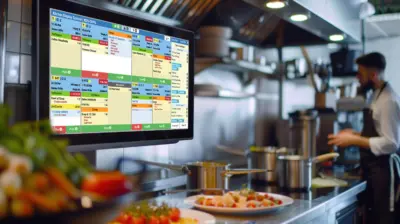
A kitchen display system is a digital screen mounted in the kitchen, connected to your POS. When a server enters an order, it shows up on the KDS instead of printing to a paper ticket. Each station sees what applies to them. Timers count how long each ticket has been open. The expo screen gives the kitchen manager a view of every active order at once.
That covers the basics. The more interesting part is what a good KDS does beyond replacing the printer. Member preferences and allergy flags travel from the POS straight to the screen without anyone writing them down again. Every stage of an order gets a timestamp. After service, you have actual data on where the kitchen slowed down, which shifts ran the longest average ticket times, and which menu items consistently held everything else up.
Paper tickets have no urgency attached to them. A KDS shows kitchen staff exactly what needs attention, in what order, without anyone having to say a word.
Where Paper Tickets Actually Break Down
The case against paper is not complicated. Tickets get wet. They fall off the rail. The handwriting on a busy night is anybody’s guess. And when a modifier or allergy note gets missed between the server and the kitchen, there is no audit trail, just a remade dish and an unhappy member.
The less obvious problem is visibility. With paper tickets, no one outside the kitchen knows where any given order stands unless they physically go back and ask. Servers lose time. Managers operate on a rough sense of how things are going rather than actual data. And after the shift, there is nothing to review because the tickets are in the trash.
For private clubs specifically, this matters more than it might at a busy restaurant. Members come back week after week. They remember the last time something went wrong. One missed allergy note is not just a service error. It is a conversation the GM has to have on Monday morning.
What a KDS Does Differently for Private Clubs?
Member Preferences reach the Kitchen
Most KDS implementations in restaurant settings handle order accuracy well but do not surface member-specific context. In a private club, that context is the whole point. When the KDS connects to the membership database, a member’s standing dietary restrictions, preferred modifications, and any notes from previous visits come through with the order automatically. The kitchen is not relying on a server to verbally relay that information, or on a handwritten note surviving the heat and noise of service.
Multi-Outlet Routing
A club is not a single dining room. Orders from the formal dining room, the bar, the pool terrace, and a halfway house halfway across the property all need to reach the right kitchen or prep station without manual rerouting. A KDS built for club operations handles that routing based on where the order originated and what is being prepared, so the grill station is not getting bar orders, and the expo screen shows a complete picture.
Stage Tracking Across the Floor
Private club kitchens often fire courses in sequence based on cues from the floor, not just time elapsed. A KDS that supports Pre-fire, Fire, Bumped, and Pushed states gives the kitchen and the front of house a common language for where each table stands. The server does not need to guess whether the entrees are close. The kitchen does not need to hold dishes because the appetizers are still on the table. Everyone is working from the same information.
Reporting That Actually Tells You Something
Average ticket time by shift. Orders that repeatedly ran long. Service periods with the highest error rates. This data exists because the KDS records every order through every stage. Clubs that use it regularly find patterns they had no way to identify before. Whether it is a particular server whose orders consistently arrive late to the kitchen, a menu item that creates a bottleneck on busy nights, or a station that needs a workflow adjustment, the data makes the problem visible before it becomes a member complaint.
The Connected F&B Picture
A KDS on its own is a useful tool. A KDS that is part of a connected F&B platform is a different thing entirely.
Here is how that plays out in practice. A member books a table through the club app. Their profile carries allergy information and seating preferences. When they arrive, the hostess checks them in against the live reservation view. The server takes the order on a tablet at the table, which sends it to the kitchen immediately. The KDS shows the member’s name, covers, standing preferences, and a countdown for each item. The expo screen has the full table in one view. Food arrives correctly prepared, on time, with no paper changing hands and no verbal relay between front and back of house.
That sequence depends on the membership profile, the reservation system, the tableside POS, and the KDS all drawing from the same data. When those pieces are separate systems loosely connected through an integration, you get partial information at each stage. When they are modules on the same platform, the data travels intact.
The value of a KDS is not the screen itself. It is what the screen knows. And what it knows depends entirely on what the rest of your system feeds it.
What Clubs Report After Making the Switch?
Orders to the Table Faster
When the kitchen receives orders the moment they are placed, operates to visible timers, and coordinates through an expo screen rather than shouting across stations, food gets to the table faster. Club technology data puts average order-to-delivery times 4 to 8 minutes shorter when KDS is paired with tableside ordering. For a member who wants lunch between rounds, that difference is noticeable.
Fewer Errors, Fewer Remakes
Most order errors happen at the handoff between the floor and the kitchen. Digital orders that go directly from the POS to the screen eliminate that handoff. Modifications and member preferences entered once carry through without anyone rewriting them. Clubs that switch typically see a drop in remade dishes and a drop in member complaints about incorrect orders, though the exact numbers vary by operation.
Less Food Waste
Wrong orders that go back to the kitchen rarely come out again in usable form. Fewer errors mean less waste. KDS data also helps kitchen staff manage prep more accurately during service, since they can see what is queued rather than over-preparing based on guesswork.
Staff Attention Goes to the Right Place
Kitchen staff working from a screen spend less time managing tickets and more time cooking. Servers with tableside ordering spend less time at the POS terminal and more time with members. The friction does not disappear, but it moves away from the places where it affects member experience.
Questions Worth Asking Before You Buy
Most KDS vendors will tell you their system is right for clubs. These questions tend to reveal whether that is actually true:
- Does the KDS connect to the membership database, or does it only receive basic order data from the POS?
- Can member preferences and allergy flags appear at the ticket level without any manual input?
- How does the system handle multi-outlet routing across a property with several dining areas?
- What stage management options are available, and can they be configured to match how your kitchen actually runs?
- Is management reporting built into the same platform, or does it require pulling data from somewhere else?
- How does the KDS connect to dining reservations, tableside POS, and mobile ordering if those are in use?
- What happens if a screen goes down mid-service?
The answers tell you whether you are looking at a tool built for private clubs or a restaurant product being pitched into a club context.
How Northstar’s KDS Fits into the Platform
Northstar’s Kitchen Display System is part of the full F&B suite within Nexus, alongside Dining Reservations, Tableside POS, Grab N Go, and F&B POS. All of these modules run on the same platform and pull from the same membership data. That means information entered at the reservation stage is already in the system when the order is placed, and it travels to the kitchen without anyone re-entering it.
The KDS handles real-time order flow to prep and expo screens, member preference visibility at the ticket level, countdown timers based on actual menu item prep times, and stage tracking through Pre-fire, Fire, Bumped, and Pushed. The management dashboard surfaces ticket time data and bottleneck reporting after every service.
For clubs already on Northstar F&B POS, adding KDS is not a new integration. It is turning on a module within the platform already in use, with member data and order history already in place.
Want to see how Northstar’s KDS fits into your club’s F&B setup? Request a Demo.